
<span id="top"></span>
This resource outlines the technical infrastructure behind Qualified’s Microsoft integration. Below, you’ll find specifications on the OAuth 2.0 authentication flow, Microsoft Graph API subscriptions, and our strict data access policies to ensure your organization's data remains secure while syncing in real time.
- OAuth 2.0 Authentication Flow
- Microsoft Graph Subscriptions
- Microsoft Permissions (OAuth Scopes)
- How Real-time Updates Work
- Token Refresh & Credential Maintenance
- Data Access & Security
<span id="oauth_2.0_authentication_flow"></span>
OAuth 2.0 Authentication Flow
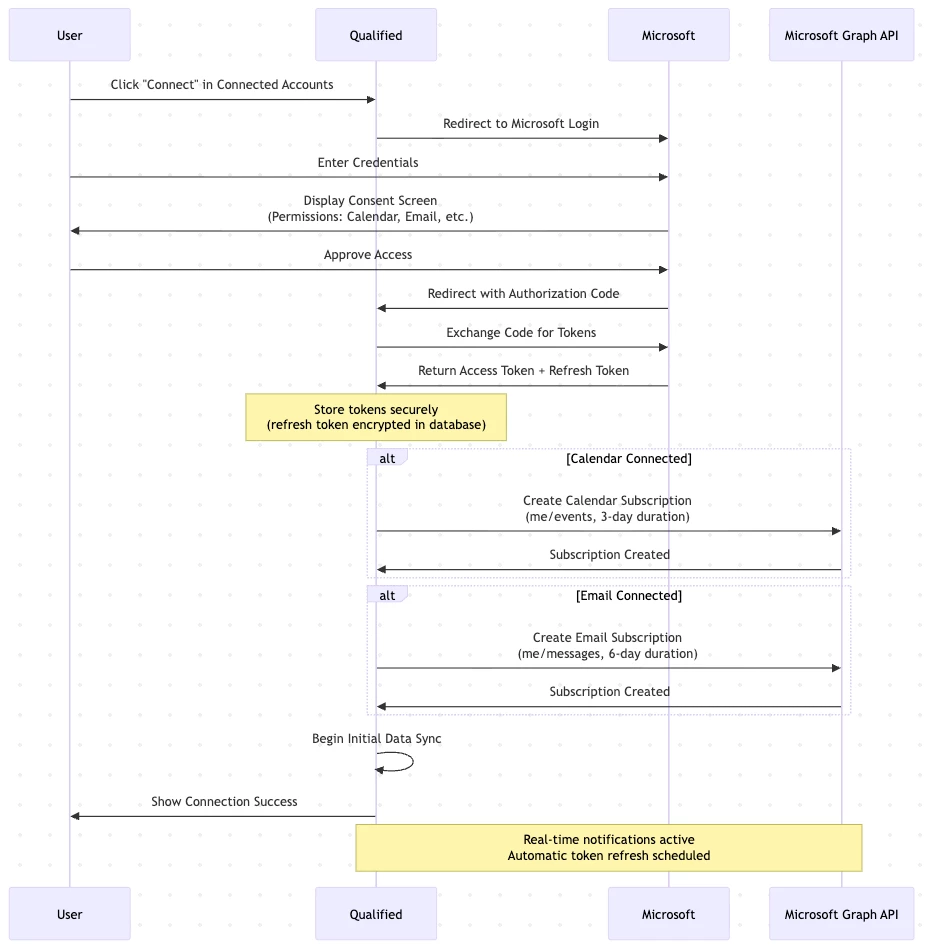
- User Initiates Connection
- User clicks "Connect" in the connected accounts section in Qualified
- Qualified redirects to Microsoft login
- Microsoft Authentication & Consent
- User authenticates with Microsoft credentials
- Microsoft displays consent screen showing requested permissions
- User approves access to calendar and/or email data
- Authorization & Token Exchange
- Microsoft redirects back to Qualified with authorization code
- Qualified exchanges authorization code for access tokens
- Tokens are securely stored:
- Access Token: Short-lived token for API requests
- Refresh Token: Long-lived token for obtaining new access tokens
- Token Expiration: Timestamp for when access token expires
- Connection Established
- For calendar: Creates Microsoft Graph subscription for event notifications
- For email: Creates Microsoft Graph subscription for message notifications
- Initial data sync begins
- Connection Complete
- User sees confirmation in Qualified
- Calendar/email data begins syncing
- Real-time notifications are active
<span id="microsoft_graph_subscriptions"></span>
Microsoft Graph Subscriptions
Qualified creates Microsoft Graph API subscriptions to receive real-time notifications about changes to your calendar and email data.
Calendar Subscription
Microsoft Resource: me/events (user's calendar events)
Change Types: created, updated, deleted
Subscription Duration: ~3 days (auto-renewed)
Notification Endpoint: Qualified servers
How it works:
- When you connect your Microsoft calendar, we create a subscription
- Microsoft sends notifications for any calendar event changes
- Subscriptions are automatically renewed to maintain real-time sync
- We use delta queries to efficiently sync only what changed
Email Subscription
Microsoft Resource: me/messages (user's email messages)
Change Types: created (new emails only)
Subscription Duration: 6 days (auto-renewed)
Notification Endpoint: Qualified servers
How it works
- When you connect your Microsoft email, we create a subscription
- Microsoft sends notifications when inbox changes
- We use delta queries to efficiently sync only new messages
- Subscriptions are automatically renewed to maintain real-time processing
<span id="microsoft_permissions"></span>
Microsoft Permissions (OAuth Scopes)
Qualified requests specific Microsoft Graph API permissions based on which features you enable. During OAuth, Microsoft will show you exactly what permissions are being requested.
Core Permissions (Always Requested)
- User.Read: Read your basic profile information
- offline_access: Maintain access when you're not actively using the app
Calendar Integration
- Calendars.ReadWrite: Read and write calendar events
- View your calendar availability
- Create, update, and cancel calendar events
- Sync calendar data for scheduling
Email Integration
- Mail.ReadWrite: Read and manage email messages
- Access email messages and threads
- Read message content and metadata
- Manage drafts and folders
- Mail.Send: Send emails on your behalf
- Send emails from your account
- Send replies to conversations
Teams Meeting Integration
- OnlineMeetings.ReadWrite: Create and manage Teams meetings
- Generate Teams meeting links
- Add Teams meetings to calendar events
- Update meeting details
Available Integration Combinations
- Calendar only (If user connect their calendar)
- Calendar + Teams Meeting (if user connects their Microsoft Teams account)
- Calendar + Email (If customer's org enables the Email features)
- Calendar + Email + Teams Meeting (If user connects their calendar, the customer's org has Email features enabled, and user connects their Microsoft Teams account)
Note: You only grant the permissions needed if the features are available in the org and the user actively connects.
<span id="real_time_updates"></span>
How Real-time Updates Work
Calendar
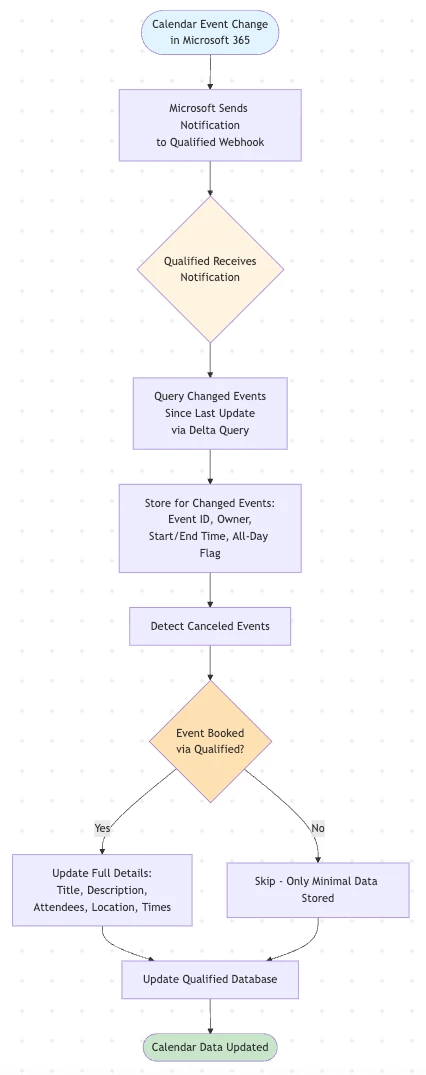
When a calendar event is created, updated, or deleted in Microsoft 365:
- Microsoft sends a notification to Qualified's webhook endpoint
- Notification includes the subscription ID and change type
- Qualified processes the notification and syncs the specific changes
- Your calendar data in Qualified is updated within seconds
Lifecycle Events:
- If Microsoft requires reauthorization, we automatically handle the renewal
- If notifications are missed, we perform a full sync to catch up
- Subscriptions are continuously maintained for uninterrupted service
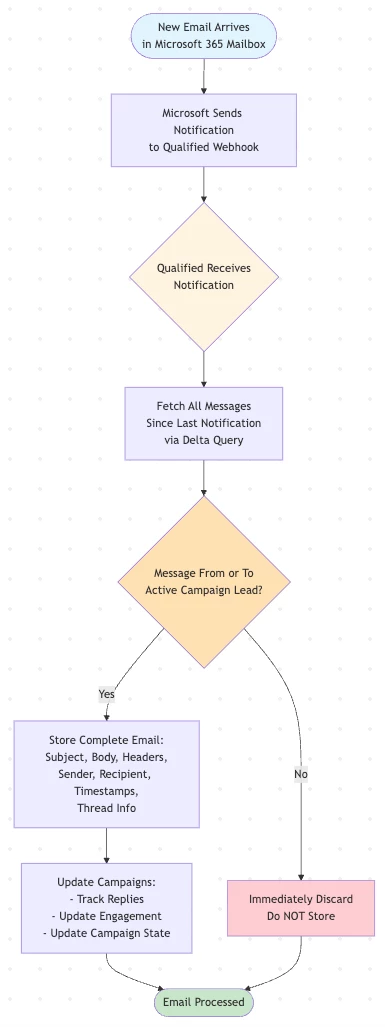
When a new email arrives in your Microsoft 365 mailbox:
- Microsoft sends a notification to Qualified's webhook endpoint
- Notification indicates a new message was created
- Qualified fetches and processes the message content
- Email is analyzed for replies, conversations, and relevant data
- Your team sees updates in real-time
Benefits of Webhook-Based Sync
- Near-instantaneous updates (typically within 1-3 seconds)
- Efficient: Only changed data is synced, not entire mailbox/calendar
- Reliable: Automatic retry and fallback mechanisms
- Battery-friendly: No polling required
<span id="token_refresh_credential_maintenance"></span>
Token Refresh & Credential Maintenance
Access Token Refresh
Endpoint: Microsoft OAuth 2.0 token endpoint
- Access tokens expire and need periodic refresh
- Qualified automatically refreshes tokens using the refresh token
- This happens without user interaction
- Refresh occurs before tokens expire to ensure uninterrupted service
Proactive Credential Maintenance
- Microsoft refresh tokens can expire after 90 days of inactivity
- Qualified proactively refreshes credentials every 90 days or when credentials access is about to expire
- Ensures continuous access without requiring re-authentication
When Re-authentication is Required
- If refresh fails (e.g., user revoked access, token invalidated)
- User will be notified to reconnect their Microsoft account
<span id="data_access_security"></span>
Data Access & Security
What Data We Access
Calendar: When we receive a calendar change notification:
- For meetings NOT booked through Qualified:
- We only store: event ID, event owner (which team member), start time, end time, and all-day flag
- We DO NOT store: titles, descriptions, locations, attendee lists, or organizer information
- This minimal data is used solely for availability checking
- For meetings booked through Qualified:
- We store complete details: title, description, attendees and timing information
- This enables us to track and manage meetings you've scheduled via our platform
Email: When we receive a new email notification:
- We immediately discard the message without storing it
- Based on email address, we check if the email is related to a lead in an active campaign
- If the email is NOT related to any of your campaigns:
- We store: subject, body, headers, sender, recipient, timestamps, thread info
- If the email is TO or FROM a lead in your campaigns:
- This allows us to track replies, engagement, and update campaign states
Security Measures
- Access tokens and Refresh tokens are persisted in our Postgres database
- Refresh tokens are long lived and therefore are encrypted before being persisted
- API communications use HTTPS/TLS encryption
- Access tokens are short-lived and automatically rotated
- Refresh tokens are securely stored and never exposed
Microsoft Security Controls
- OAuth 2.0 industry-standard authentication
- Granular permission scopes (only request what's needed)
- User must explicitly approve each permission
- Users can revoke access at any time via Microsoft account settings
- Microsoft tenant admins can review and control OAuth applications
Disconnecting
- Users can disconnect at any time from Qualified settings
- System will discard the credential and stop using it or refreshing access tokens
- Webhook subscriptions are automatically removed
Data Retention
- Calendar and email data retention follows the same policies described in the "Qualified Data Management Policy" document
Heading 1
Heading 2
Heading 3
Heading 4
Heading 5
Heading 6
Lorem ipsum dolor sit amet, consectetur adipiscing elit, sed do eiusmod tempor incididunt ut labore et dolore magna aliqua. Ut enim ad minim veniam, quis nostrud exercitation ullamco laboris nisi ut aliquip ex ea commodo consequat. Duis aute irure dolor in reprehenderit in voluptate velit esse cillum dolore eu fugiat nulla pariatur.
Lorem ipsum dolor sit amet, consectetur adipiscing elit, sed do eiusmod tempor incididunt ut labore et dolore magna aliqua. Ut enim ad minim veniam, quis nostrud exercitation ullamco laboris nisi ut aliquip ex ea commodo consequat. Duis aute irure dolor in reprehenderit in voluptate velit esse cillum dolore eu fugiat nulla pariatur.
Lorem ipsum dolor sit amet, consectetur adipiscing elit, sed do eiusmod tempor incididunt ut labore et dolore magna aliqua. Ut enim ad minim veniam, quis nostrud exercitation ullamco laboris nisi ut aliquip ex ea commodo consequat. Duis aute irure dolor in reprehenderit in voluptate velit esse cillum dolore eu fugiat nulla pariatur.
Block quote
Ordered list
- Item 1
- asdfasdf
- asdfasdf
- asdfasdf
- Item 2
- Item 3
Unordered list
- Item A
- Item B
- Item C
Bold text
Emphasis
Superscript
Subscript
|
|---|
|



.svg)


